
As your affiliate marketing program grows, you’ll encounter new opportunities and challenges that come with managing a larger affiliate network.
At first, managing your affiliates individually might be simple. But as your program expands, you may start noticing a few things:
- You have a growing number of affiliates to manage.
- Your affiliates have different performance levels, goals, and needs.
- Some high-performing affiliates deserve special commission structures or personalized rewards.
- Managing affiliate commissions and account statuses individually becomes increasingly time-consuming.
These are natural challenges that come with building a successful affiliate program. And while growth brings exciting opportunities, it also creates a need for better organization and more efficient management tools.
At Affiliatly, we’re committed to providing the tools and support you need to grow your affiliate marketing program and make the most of every opportunity.
That’s why we’re excited to introduce Affiliate Categories, a new feature designed to help you organize your affiliates, simplify program management, and perform important actions across groups of affiliates.
Let’s explore how it works and how you can use it to manage your affiliate program more efficiently!
Setting Up Affiliate Categories
Before you can start organizing your affiliates, you’ll need to create the categories that best fit your affiliate program.
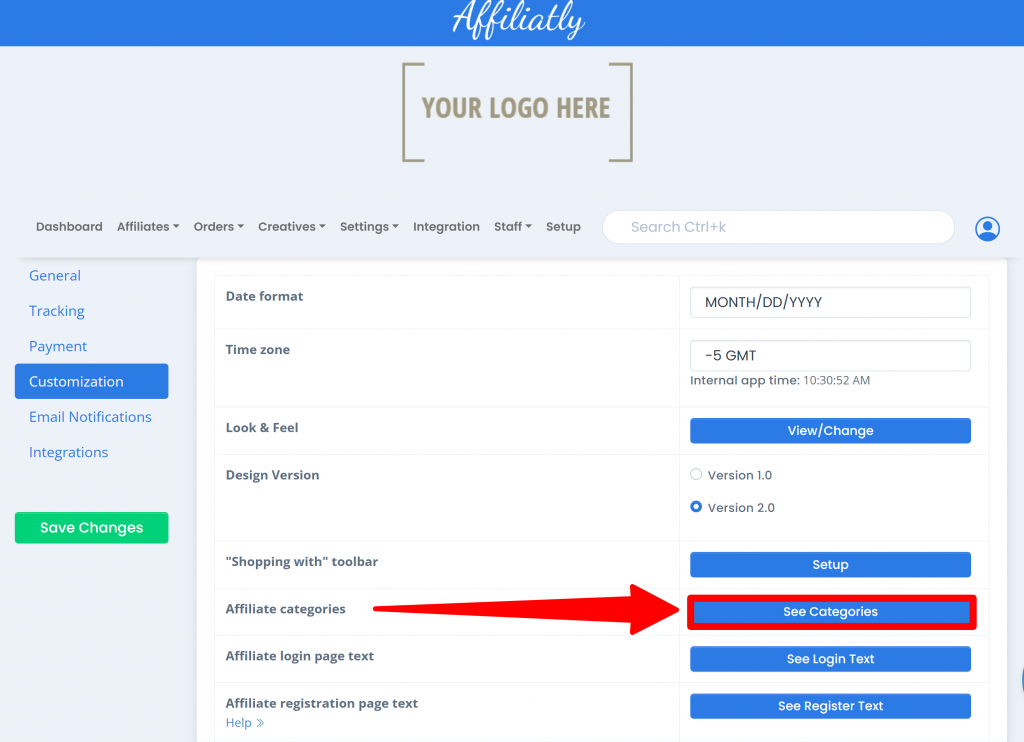
Step 1: Access the Affiliate Categories Settings
From your Affiliatly dashboard, go to:
Settings → Customization → See Categories
Quick tip: Use the Search Bar to Find Settings Faster
Looking for a specific setting? You don’t always need to navigate through multiple menus.
You can use Affiliatly’s search bar to find the Affiliate Categories settings in seconds.
Simply type “categories” into the search bar, and you’ll see a shortcut to the relevant settings page.
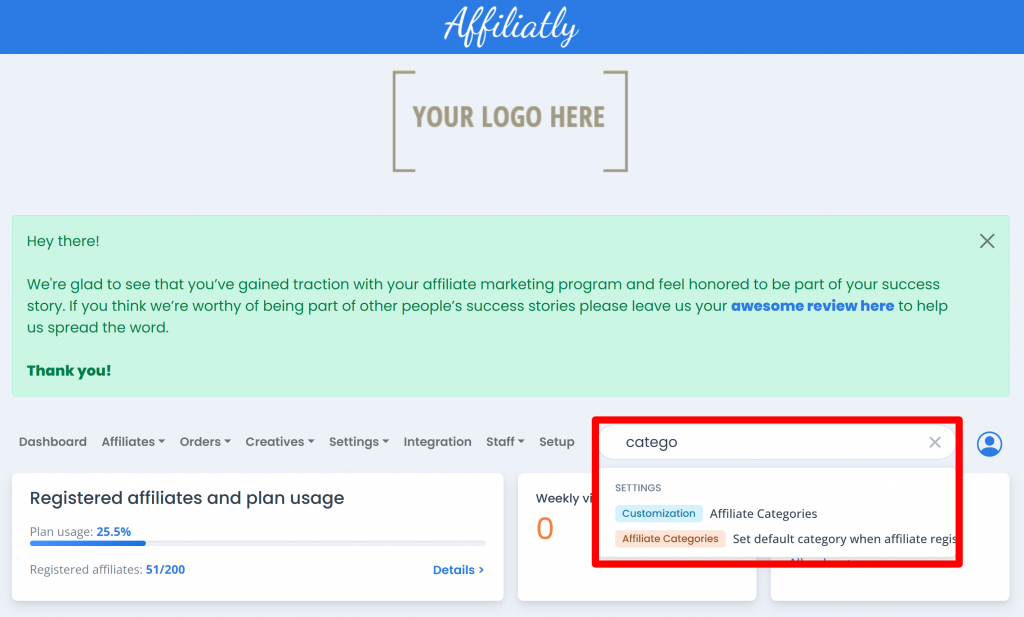
If you’re not already using the search bar, this is a great opportunity to make it part of your workflow.
As Affiliatly continues to grow, we introduce new features and configuration options to help you manage your affiliate program. While we work hard to keep navigation intuitive, finding a specific setting can sometimes take a few extra clicks.
The search bar gives you a faster way to access the tools you need, helping you spend less time navigating menus and more time growing your affiliate program.
Now, let’s get back to setting up your affiliate categories!
Step 2: Create Your Affiliate Categories
Once you open the Affiliate Categories page, you can create the categories you need to organize your affiliate network.
This is an important moment to think about your affiliate program’s structure.
Consider the different types of affiliates you work with, the commission structures you offer, and the opportunities you may want to create for high-performing partners.
A well-planned category structure can help you:
- Organize affiliates according to their role or performance.
- Apply different commission arrangements to specific groups.
- Simplify the management of affiliate account statuses.
- Create a more structured approach to growing your affiliate program.
Pro tip: Start with a Basic Affiliate Category
We recommend creating a Basic Affiliate category as the foundation of your affiliate category structure.
Why start there?
Not every affiliate will require a special commission agreement or customized management approach. Having a default category for your regular affiliates gives you a practical starting point for organizing your network.
You can then create additional categories for affiliates who require different commission structures or management actions.
For example, here’s a sample category structure inspired by the needs of more advanced affiliate programs.
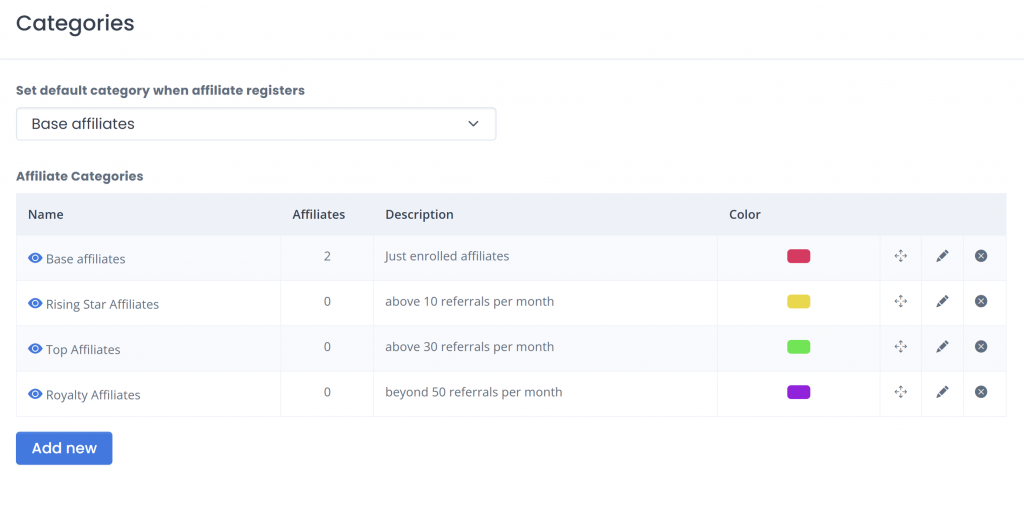
Remember: There’s no single category structure that works for every business. Design yours around your products, affiliate strategy, commission policies, and growth objectives.
The goal is to create a structure that makes managing your affiliate program easier while giving you the flexibility to develop valuable relationships with your best-performing affiliates.
Step 3: Set a Default Category for New Affiliates
Once you’ve created your categories, it’s time to choose which category new affiliates will automatically join when they register for your affiliate program.
This is where the Basic Affiliate category we recommended earlier becomes particularly useful.
By assigning it as your default category, you can ensure that new affiliates are automatically organized without requiring you to manually assign a category to every new registration.
How to Set the Default Category
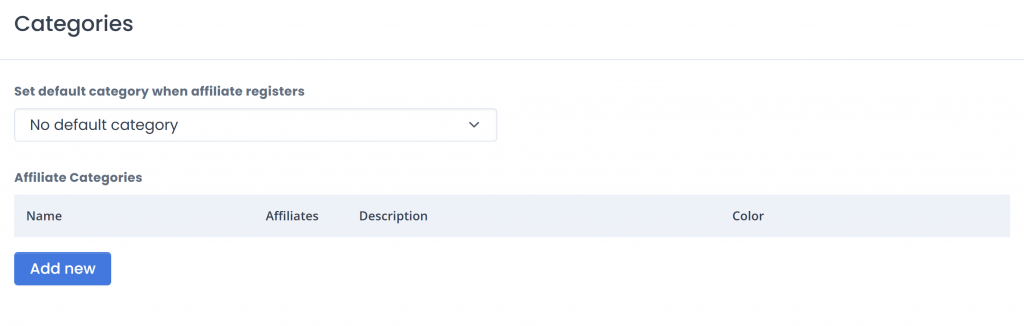
On the Affiliate Categories settings page, locate:
Set default category when affiliate registers
Select the category you want to assign automatically to new affiliates.
For example, you could select Basic Affiliate as your default category.
This allows new affiliates to enter your program with a consistent starting classification. As they develop and their needs change, you can assign them to a different category.
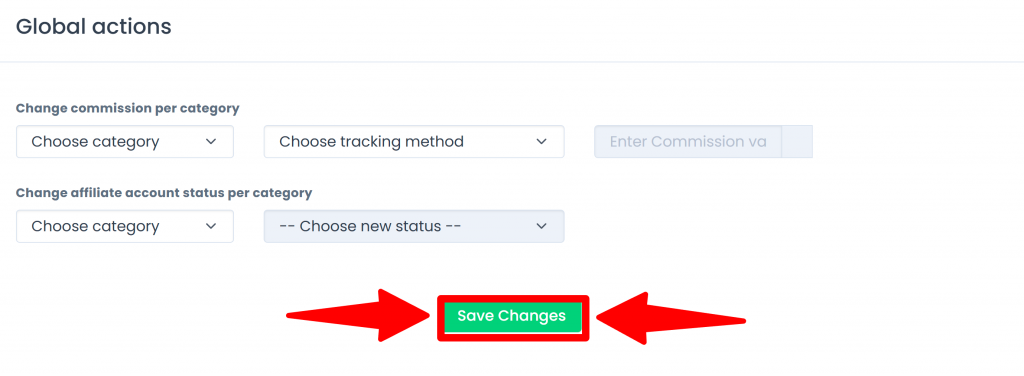
Important: Save Your Changes
Whenever you update your settings, remember to click Save Changes at the bottom of the page.
This ensures your configuration is saved correctly.
Once your categories and default category are configured, you’re ready to organize your existing affiliates.
Step 4: Assign Existing Affiliates to Categories
Your default category will automatically apply to new affiliate registrations. However, your existing affiliates will need to be assigned to the appropriate categories.
This gives you the opportunity to organize your current affiliate network according to the structure you’ve created.
How to Assign an Affiliate to a Category
From the main menu, go to:
Affiliates → View Affiliates
Find the affiliate you want to categorize.
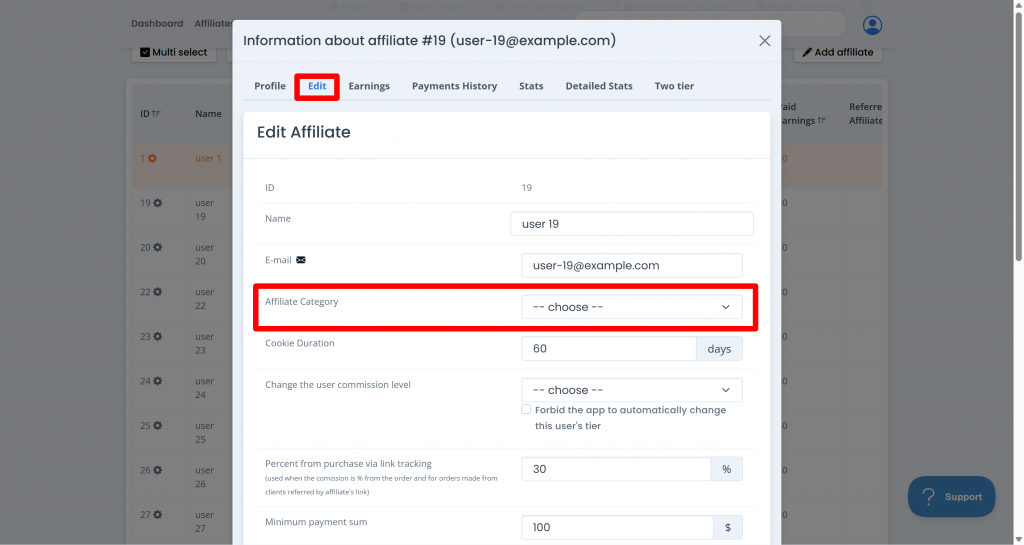
Next, click the gear icon associated with the affiliate to open their details.
From the affiliate details page:
- Open the Edit tab.
- Locate the Affiliate Category dropdown.
- Select the category you want to assign to the affiliate.
- Save your changes if required.
Repeat this process for your existing affiliates until your network is organized according to your category structure.
It might take some time to complete the initial organization, especially if you manage a large affiliate network or you also have set up commission tiers. However, this setup creates the foundation for more efficient affiliate management through Global Actions.
And that’s where things become particularly useful.
The Biggest Advantage: Global Actions
Creating categories and assigning affiliates takes some initial effort. But once your affiliate network is organized, you gain access to a more efficient way of managing important settings across groups of affiliates.
Affiliate Categories lets you exchange a one-time organizational effort for repeatable management actions that can save you time as your program grows.
Instead of finding affiliates individually and updating their settings one by one, you can use Global Actions to apply specific changes to an entire category.
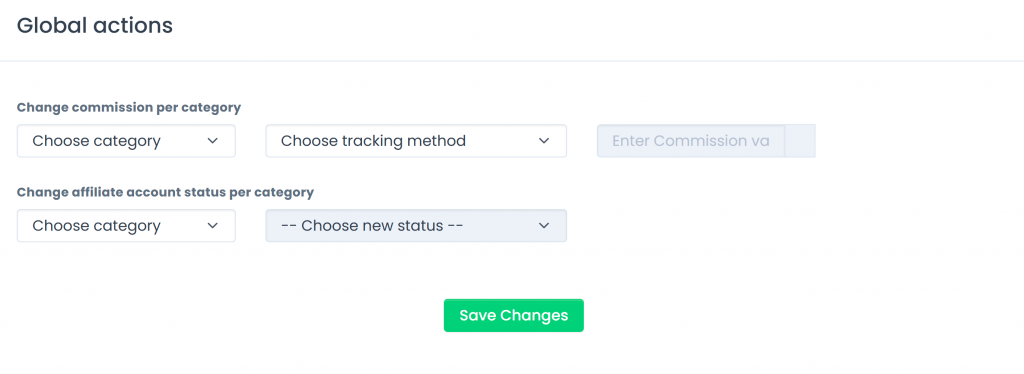
Let’s explore the two available Global Actions.
1. Change Commission per Category
Managing affiliate commissions is an important part of running a successful affiliate marketing program.
As your business evolves, you may need to adjust commission rates based on affiliate categories, tracking methods, or changes to your reward strategy.
Without a structured approach, making these changes manually can take considerable time.
The Change commission per category Global Action allows you to modify commissions for affiliates who match your selected criteria.
You can combine:
Affiliate category + Tracking method + Commission percentage
This gives you more control over how commissions are managed across different groups of affiliates.
Example: Updating Commissions for Basic Affiliates
Let’s say you’ve reviewed your affiliate program’s performance and decided that coupon code referrals generated by your Basic Affiliate category should receive a 10% commission.
Instead of opening each affiliate account and updating the commission individually, you can configure a Global Action using the following criteria:
- Category: Basic Affiliate
- Tracking method: Coupon code
- Commission: 10%
The action will update the commission for affiliates who match your selected criteria.
Less manual work, fewer repetitive changes, and more efficient affiliate program management.
This can be especially helpful when your affiliate network grows and you need to make recurring commission adjustments.
2. Change Affiliate Account Status per Category
Commission management isn’t the only task that becomes more complex as your affiliate program expands.
You may also need to update the status of multiple affiliates at once.
For example, you might want to temporarily block the activities of affiliates belonging to a specific category after a campaign ends.
The Change affiliate account status per category Global Action allows you to update the account status of affiliates within a selected category.
You can combine:
Affiliate category + Account status
Example: Blocking Affiliates in the Royalty Category
Imagine you’ve completed a campaign and decided to pause the activities of affiliates in your Royalty category.
Instead of opening each affiliate account individually, you can use a Global Action to apply the status change to the selected category.
For example:
- Category: Royalty
- New status: Block
The account status of affiliates matching the selected category will be updated accordingly.
This helps you manage groups of affiliates more efficiently when you need to make changes after campaigns, adjust your program structure, or update account access.
One category, one action, and no need to repeat the same change manually across every affiliate.
Important: Changes made through this Global Action apply to future referrals. They do not change commissions that have already been generated or recorded for previous referrals.
Tips for Getting the Most Out of Affiliate Categories
Affiliate Categories is designed to support more organized and efficient affiliate program management. To get the most value from the feature, consider the following recommendations.
1. Plan Your Category Structure Before Creating It
Take some time to think about how you want to organize your affiliates.
Depending on your business, categories might reflect different affiliate types, commission arrangements, or other distinctions that matter to your management strategy.
A thoughtful structure will make it easier to use Global Actions later.
2. Start Simple and Expand as Your Program Grows
You don’t need to create every possible category from the beginning.
Start with a practical structure, such as a Basic Affiliate category, and expand it as your affiliate network develops.
Your categories should support your current needs while leaving room for future growth.
3. Consider Your High-Performing Affiliates
Some affiliates may generate significantly more sales or revenue than others.
You might want to develop special commission agreements or reward structures for these partners.
Organizing your affiliate network into categories can help you establish a clearer management structure for these relationships.
Remember that categories are a tool for organizing your program. Your specific commission policies and agreements should reflect your business strategy and the arrangements you establish with your affiliates.
4. Use Global Actions to Reduce Repetitive Work
Once your categories are configured, look for recurring tasks that can benefit from Global Actions.
Whether you’re updating commission settings or changing affiliate account statuses, applying actions to relevant groups can reduce the amount of manual work involved in managing your affiliate network.
Important: Changes made through this Global Action apply to future referrals. They do not change commissions that have already been generated or recorded for previous referrals.
Grow Your Affiliate Program with More Efficient Management
As your affiliate program grows, having more affiliates is exciting. But managing that growth effectively requires the right tools and organizational structure.
With Affiliatly’s Affiliate Categories, you can organize your affiliates, establish a more structured management process, and use Global Actions to simplify recurring administrative tasks.
The feature is designed to help you spend less time making repetitive updates and more time focusing on your affiliate marketing strategy, partner relationships, and business growth.
We’re continuously working on improving Affiliatly and developing tools that help you manage your affiliate program more effectively.
Your feedback, questions, and suggestions are valuable to us. If you have ideas about how we can improve your experience or make affiliate program management easier, our support team is always happy to hear from you.
Thank you for trusting Affiliatly as part of your affiliate marketing journey. We look forward to helping you grow!
See you next time!